iLogo - Text Designer1.0
Publisher Description
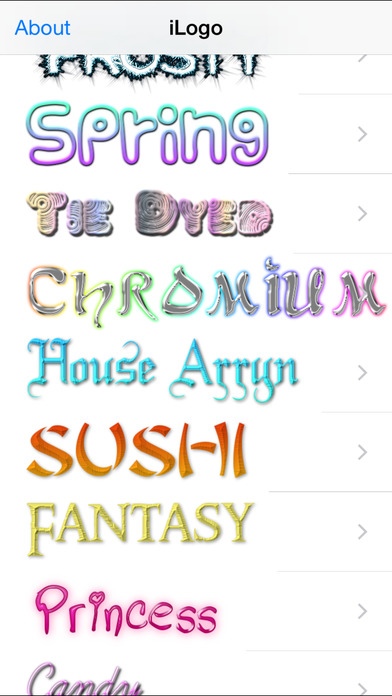
iLogo - Text Designer is a graphic design app derived from the popular CoolText web graphics generator. This app features a wide variety of logo and text designs as well as advanced customization options - there are thousands of different possibilities that you can create! iLogo is appropriate for professional logo design, personal projects, and just having fun.
Features:
Make your text logo say whatever you want
Thousands of different fonts to choose from
40 different logo templates to choose from
Image sizing and quality adjustments
Pinpoint the color you want to use on the spectrum, or type hex values directly
Save high-quality PNG images to your photo album
Adjust gradient and shadows
And more!
Templates Included:
Skater
Keen
Fun
Easy
White
Gold Trim
Alien Glow
Glowing Steel
Tough
Pimpin
iText
Hot
Glowing Hot
Neon
Water
Bad Acid
Studio 54
Chick Flick
Comic
Vampire
Snowman
Cupid
Legal
Club
Frosty
Spring
Tie Dyed
Chromium
House Arryn
Sushi
Fantasy
Princess
Candy
Simple
Chrome One
Chrome Two
Gradient Bevel
Starburst
Golden
Rage
Requires iOS 7.0 or later. Compatible with iPhone, iPad, and iPod touch.
About iLogo - Text Designer
The company that develops iLogo - Text Designer is Lucas Jackson. The latest version released by its developer is 1.0.
To install iLogo - Text Designer on your iOS device, just click the green Continue To App button above to start the installation process. The app is listed on our website since 2014-10-15 and was downloaded 1 times. We have already checked if the download link is safe, however for your own protection we recommend that you scan the downloaded app with your antivirus. Your antivirus may detect the iLogo - Text Designer as malware if the download link is broken.
How to install iLogo - Text Designer on your iOS device:
- Click on the Continue To App button on our website. This will redirect you to the App Store.
- Once the iLogo - Text Designer is shown in the iTunes listing of your iOS device, you can start its download and installation. Tap on the GET button to the right of the app to start downloading it.
- If you are not logged-in the iOS appstore app, you'll be prompted for your your Apple ID and/or password.
- After iLogo - Text Designer is downloaded, you'll see an INSTALL button to the right. Tap on it to start the actual installation of the iOS app.
- Once installation is finished you can tap on the OPEN button to start it. Its icon will also be added to your device home screen.
